 Folio Writer
Track Changes in plain text
Word made "show me exactly what changed, and let me decide" the standard for serious revision — and then locked it inside .docx. Folio Writer brings the same discipline to Markdown, with one important difference: every tracked change is readable in the file itself.
Revisions you can read in any editor
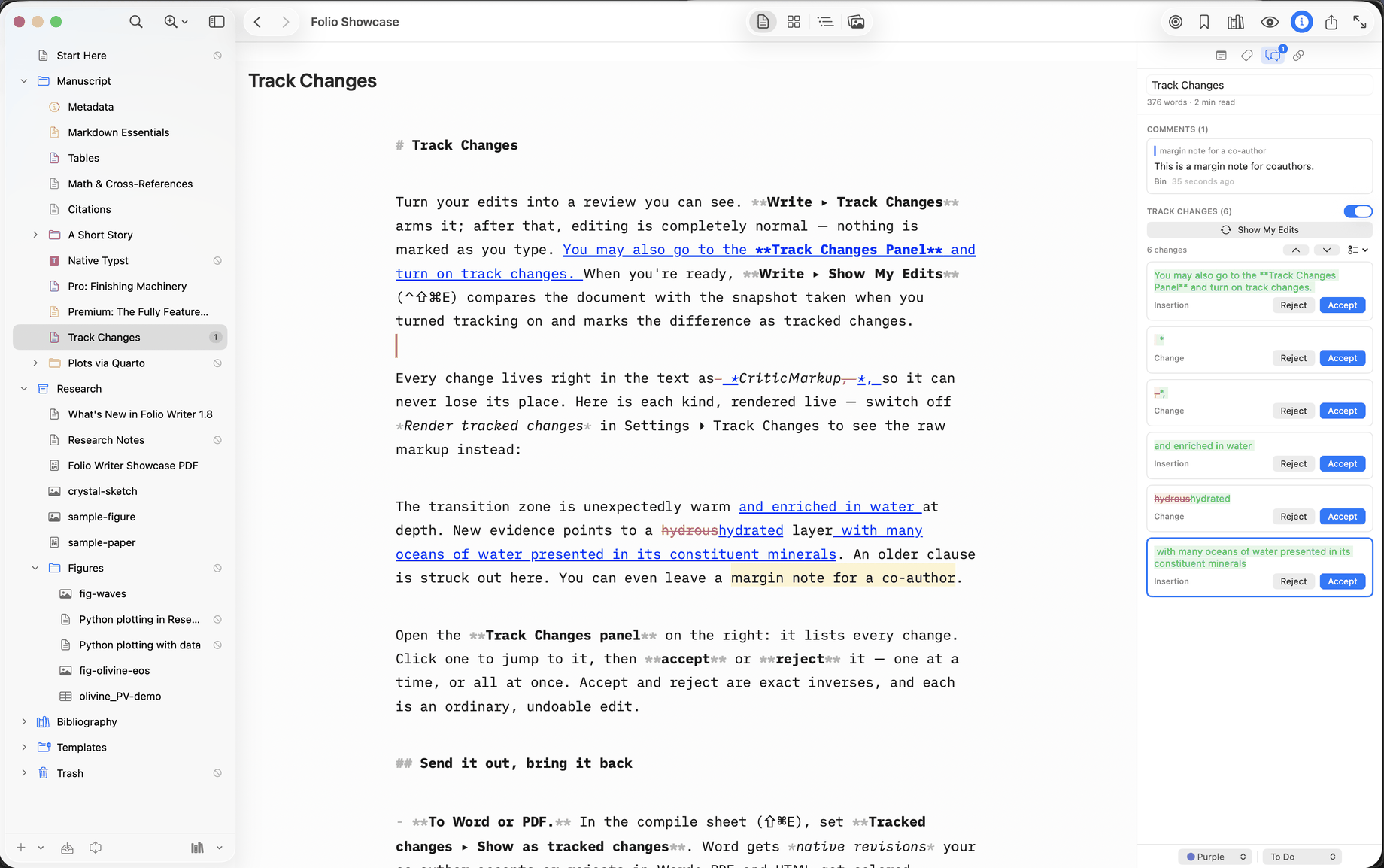
Turn tracking on and write normally. As you edit, your changes are recorded as CriticMarkup — an open, human-readable convention for marking revisions in plain text:
The mantle is {--mostly--}{++predominantly++} solid rock,
{~~which flows~>yet it convects~~} over geologic time.
That's the actual file content. No hidden revision database, no binary
sidecar — a collaborator with any text editor sees precisely what you
changed, and git diff agrees. In Folio Writer's editor you
don't stare at the markup unless you want to: rendered tracked changes show
as insertions and deletions
in color, and the delimiters step aside so the paragraph reads cleanly.
Edit freely, review honestly
Tracking is built on a fixed original: the moment you arm it, Folio Writer snapshots the clean text (visible in your snapshots list as "Track Changes started"), so Show My Edits can always answer the question that matters — what did this session actually change? — no matter how many times you rewrote a sentence back and forth. Each change is then reviewable on its own: accept it, reject it, move to the next. Accepting and rejecting are ordinary edits, which means they're undoable like everything else.
Three ways to compile
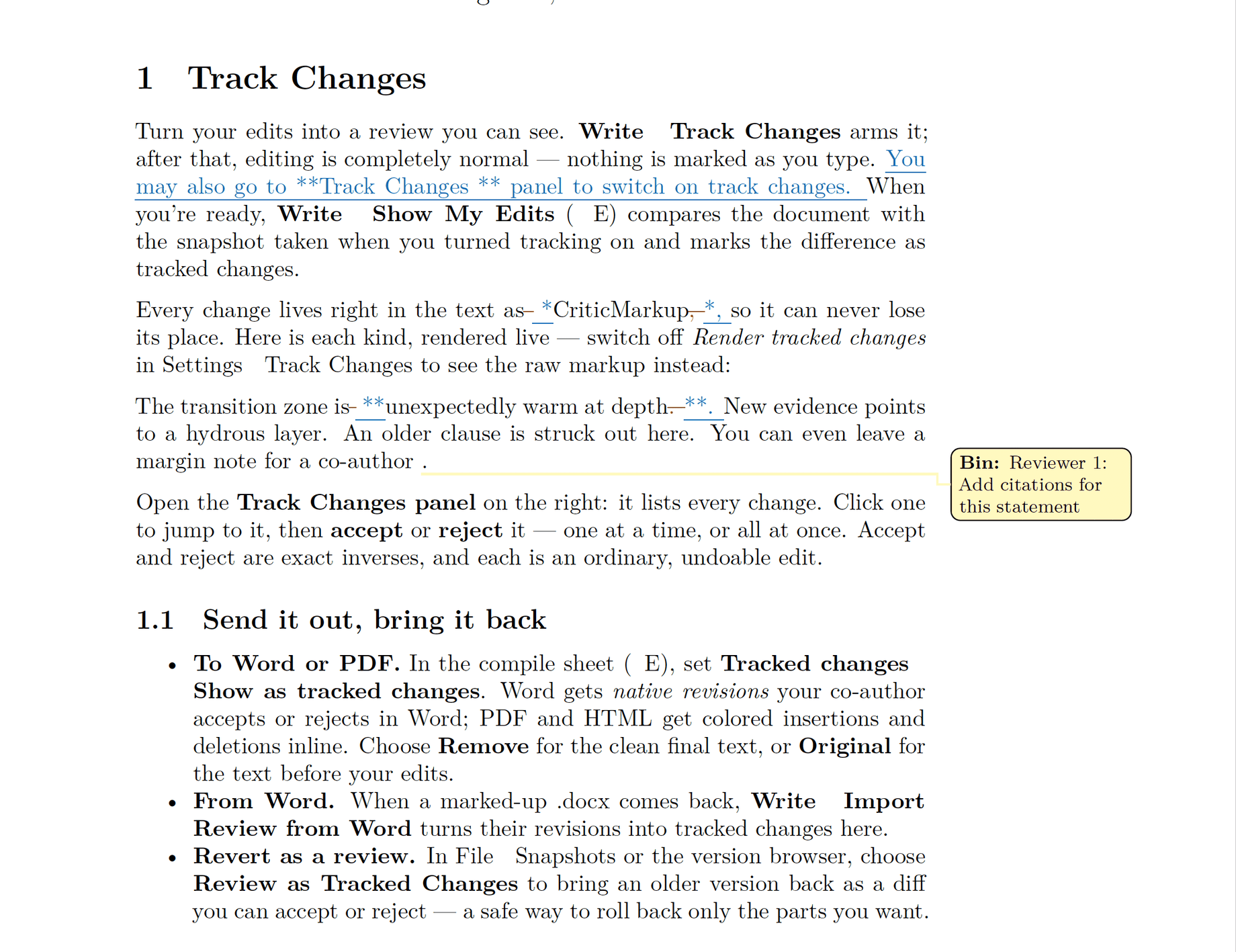
A manuscript with open changes can compile three ways, and the choice lives in the compile sheet, not in your text:
Remove (accept all) — the submission build: every pending change applied, clean output, file untouched. Show as tracked changes — the review build: a Word .docx carries them as native tracked changes your co-author reviews in Word's own UI; a PDF shows colored insertions and strikeouts. Original (reject all) — the before picture, for comparing drafts.
Where it meets collaboration
Track Changes is for your revision passes. When other people enter the picture, the same plain-text machinery powers the collaboration tools: suggested edits let anyone propose a change — attributed, shown as a diff, accepted or rejected by you — and the Word round trip exports your suggestions as real tracked changes for a co-author who lives in Word, then imports their edits back as proposals. Comments ride alongside: highlight a passage, leave a margin note for a co-author (⇧⌘M), and it travels with the text — into Word bubbles on export, and into the response-to-reviewers letter when the remarks are a reviewer's. Nothing lands in your manuscript without your say-so, and at every step the file on disk stays plain text.
The quiet advantage
Because tracked changes are just text, everything else still works: project search finds words inside pending edits, snapshots diff cleanly, sync merges safely between your Mac and the free iPhone/iPad app, and a manuscript with ten years of history is still a folder of files you can open anywhere. Revision control shouldn't be the thing that locks you in.